
今天很多人会很奇怪,我怎么突然之后就讲到第九篇了,其实我之前已经讲了区块链开发货币交易所开发方面知识和代码已经有十篇左右了,只是没在发的文章平台比较分散,具体想看可以看文章结尾的联系方式就可以找到我,今天我讲一下区块链几个框架设计方面的知识,包括Hyperledger Fabric介绍.Fabric账本设计.让DLT产生协作,对Corda和GSL的思考.Fabric 1.0账本设计.Fabric 1.0 Endorse背书策略.Hyperledger Fabric1.0架构概览,等等这些文章篇幅很长大家慢慢看,下面我开始说第一个.下面请看 Fabric架构的图片
讲到区块链开发教育所的开发方面知识和代码已经有十篇左右了,只是没在发的文章平台比较散,具体想看可以看文章的结尾的联系方式找到我,今天极乐讲解几个区块链框架方面的知识,
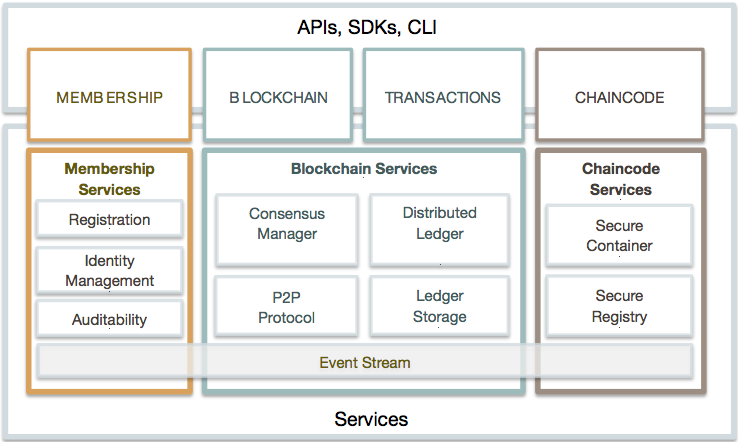
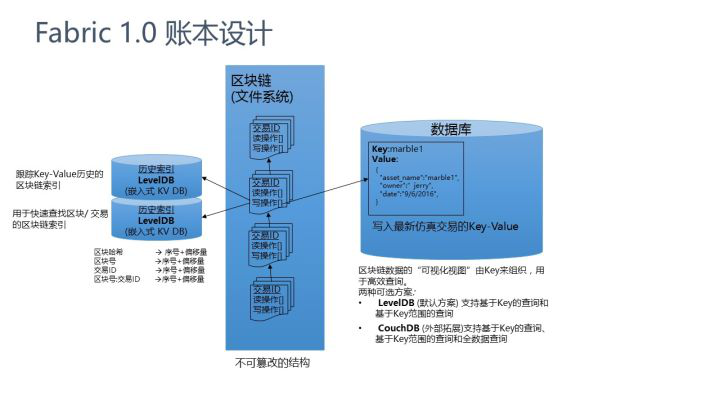
第一,fabric 当前结构板本的一些主要功能如下,被定位许可制的区块链,由Go,java语言实现来进行运行,任意智能合约,用户定义的智能和约封装在Docker容器中执行,系统智能合约与节点运营相同的进程,共识算法是可以插拨的,目前支持用户PBFT,通过证书颁发机构(CA)提供TLS证书,登录证书和交易证书,使用KV持久化数据存储,支持RocksDB,LeveIDB,支持预定义和定制事件的事件框架,与Fabric交互的客户端Node,js,Python SDK,支持基本的REST API和CLI
第二命令行下的背书策略语法:在Fabric CLI中,使用了一种简单的boolean表达式来解释Endorse节点的背书策略。Fabric 1.0使用MSP(成员管理服务)来描述主体principal,该MSP用于验证签名者的身份以及签名者在该MSP内所具有的权限。目前,支持两种角色:成员和管理员。 主体Principals的通用表现形式是MSP.ROLE,其中MSP是指MSP 的ID,ROLE是 member 或admin。 一个有效主体的示例是“Org0.admin”(Org0 MSP的任意管理员)或“Org1.member”(Org1 MSP的任意成员)。现我将首先解释背书(endorsement)这一概念。“背书”这个词源来自银行票据业务,是指票据转让时原持有人在票据背面加盖自己的印鉴证明该票据真实有效、如果有问题就可以找原持有人。
命令行语法是这样的:EXPR(E[, E...])其中EXPR可以是AND或OR,代表两个boolean表达式,E是主体或对EXPR的另一个嵌套调用。
例如:AND('Org1.member', 'Org2.member', 'Org3.member') 请求三个背书节点的签名;OR('Org1.member', 'Org2.member') 请求两个背书节点中的任意一个的签名;OR('Org1.member', AND('Org2.member', 'Org3.member')) 请求来自Org1 MSP成员或来自Org2 MSP成员和来自Org3 MSP成员的任意一个签名。
编译fabric tools
我们会编译以下几个工具:
github.com/hyperledger/fabric/common/configtx/tool/configtxgen
github.com/hyperledger/fabric/common/tools/cryptogen
github.com/hyperledger/fabric/common/tools/configtxlator
github.com/hyperledger/fabric/peer
以上每个工具都需要读取一个yaml文件配置,在配置文件中我们指明网络的拓扑结构,证书地址等。
cd $GOPATH/src/github.com/hyperledger/fabric
make release
ls -rtl release/linux-amd64/bin
-rwxrwxr-x 1 shouhewu shouhewu 15124356 Jul 17 13:58 configtxgen
-rwxrwxr-x 1 shouhewu shouhewu 7315638 Jul 17 13:58 cryptogen
-rwxrwxr-x 1 shouhewu shouhewu 16141847 Jul 17 13:58 configtxlator
-rwxrwxr-x 1 shouhewu shouhewu 22949903 Jul 17 13:58 peer
-rwxrwxr-x 1 shouhewu shouhewu 19942880 Jul 17 13:59 orderer
-rwxrwxr-x 1 shouhewu shouhewu 774 Jul 17 13:59 get-docker-images.sh
-rwxrwxr-x 1 shouhewu shouhewu 458 Jul 17 13:59 get-byfn.sh
Cryptogen Tool(cryptogen)
我们会使用crptogen tool 为网络中的节点,用户生成密码证书(x509 certs)。
怎么运行的?
Cryptogen 读取 crypto-config.yaml 文件,yaml文件中包含网络拓扑结构,这个yaml文件可以帮我们为每个组织和组织中的成员生成证书库。每个组织分配一个根证书(ca-cert),这个根证书会绑定一些peers和orders到这个组织。fabric中的交易和通信都会被一个参与者的私钥(keystore)签名,并会被公钥(signcerts)验证.yaml配置文件中有一个"count"变量,我们用这个变量表示一个组织中会有多少个节点。在我们的文档的例子中每个组织会有两个节点。
crypto-config.yaml :
# Copyright IBM Corp. All Rights Reserved.
#
# SPDX-License-Identifier: Apache-2.0
#
# ---------------------------------------------------------------------------
# "OrdererOrgs" - Definition of organizations managing orderer nodes
# ---------------------------------------------------------------------------
OrdererOrgs:
# ---------------------------------------------------------------------------
# Orderer
# ---------------------------------------------------------------------------
- Name: Orderer
Domain: example.com# ---------------------------------------------------------------------------
# "Specs" - See PeerOrgs below for complete deion# ---------------------------------------------------------------------------
Specs:
- Hostname: orderer
# ---------------------------------------------------------------------------
# "PeerOrgs" - Definition of organizations managing peer nodes
# ---------------------------------------------------------------------------
PeerOrgs:
# ---------------------------------------------------------------------------
# Org1
# ---------------------------------------------------------------------------
- Name: Org1
Domain: org1.example.com# ---------------------------------------------------------------------------
# "Specs"# ---------------------------------------------------------------------------
# Uncomment this section to enable the explicit definition of hosts in your
# configuration. Most users will want to use Template, below
#
# Specs is an array of Spec entries. Each Spec entry consists of two fields:
# - Hostname: (Required) The desired hostname, sans the domain.
# - CommonName: (Optional) Specifies the template or explicit override for# the CN. By default, this is the template:
#
# "{{.Hostname}}.{{.Domain}}"#
# which obtains its values from the Spec.Hostname and
# Org.Domain, respectively.
# ---------------------------------------------------------------------------
# Specs:
# - Hostname: foo # implicitly "foo.org1.example.com"# CommonName: foo27.org5.example.com # overrides Hostname-based FQDN set above
# - Hostname: bar
# - Hostname: baz
# ---------------------------------------------------------------------------
# "Template"# ---------------------------------------------------------------------------
# Allows for the definition of 1 or more hosts that are created sequentially
# from a template. By default, this looks like "peer%d" from 0 to Count-1.
# You may override the number of nodes (Count), the starting index (Start)
# or the template used to construct the name (Hostname).
#
# Note: Template and Specs are not mutually exclusive. You may define both
# sections and the aggregate nodes will be created for you. Take care with# name collisions
# ---------------------------------------------------------------------------
Template:
Count: 2
# Start: 5
# Hostname: {{.Prefix}}{{.Index}} # default# ---------------------------------------------------------------------------
# "Users"# ---------------------------------------------------------------------------
# Count: The number of user accounts _in addition_ to Admin
# ---------------------------------------------------------------------------
Users:
Count: 1
# ---------------------------------------------------------------------------
# Org2: See "Org1" for full specification
# ---------------------------------------------------------------------------
- Name: Org2
Domain: org2.example.comTemplate:
Count: 2
Users:
Count: 1
执行结果
执行完cryptogen命令后,生成的证书会放在 crypto-config 文件夹中 。
ll crypto-configdrwxr-xr-x 4 shouhewu shouhewu 4096 Jul 17 15:15 ./
drwxr-xr-x 9 shouhewu shouhewu 4096 Jul 17 15:18 ../
drwxr-xr-x 3 shouhewu shouhewu 4096 Jul 17 15:15 ordererOrganizations/
drwxr-xr-x 4 shouhewu shouhewu 4096 Jul 17 15:15 peerOrganizations/
Configuration Transaction Generator(configtxgen)
configtxgen tool 用来生成四个artifacts:orderer bootstrap block,fabric channel configuration transaction,two anchor peer transactions(每个组织一个)
orderer block 是ordering service 的创世区块,在channel创建的时候channel transaction 文件会广播给orderer。anchor peer transaction表示每个组织在channel中的anchor 节点。
第三fabirc架构特点:Hyperledger fabirc 1.0 版本的在0.6版本基础上,针对安全、保密、部署、维护、实际业务场景需求等方面进行了很多改进,特别是Peer节点的功能分离,给系统架构具备了一个支持有多通道可插拔共识的能力,使得Fabric脱离了0.6版本带给人的青涩感(仅仅是个”验证与演示“版的,呵呵),已经接近于工业应用的需求;
我们现在看看 1.0版本的关键架构:多链与多通道Fabric 1.0 的重要特征是支持多chain和多channel;所谓的chain(链)实际上是包含Peer节点、账本、ordering通道的逻辑结构,它将参与者与数据(包含chaincode在)进行隔离。同时,一个peer节点也可以参与到多个chain中(通过接入多个channel);如下图所示

关于通道:通道是有共识服务(ordering)提供的一种通讯机制,类似于消息系统中的发布-订阅(PUB/SUB)中的topic;是发布-订阅关系,将peer和orderer在一起,通道也与账本(ledger)-状态(worldstate)紧密相关;如下图所示:

共识服务与(P1、PN)、(P1、P2、P3)、(P2、P3)组成了三个相互独立的通道,加入到不同通道的Peer节点能够维护各个通道对应的账本和状态;也其实也对应现实世界中,不同业务场景下的参与方。
